Developer tools · Crontab generator
Overlapping cron jobs: why long tasks need flock and how to add it
· Why it matters
cron concurrency operations
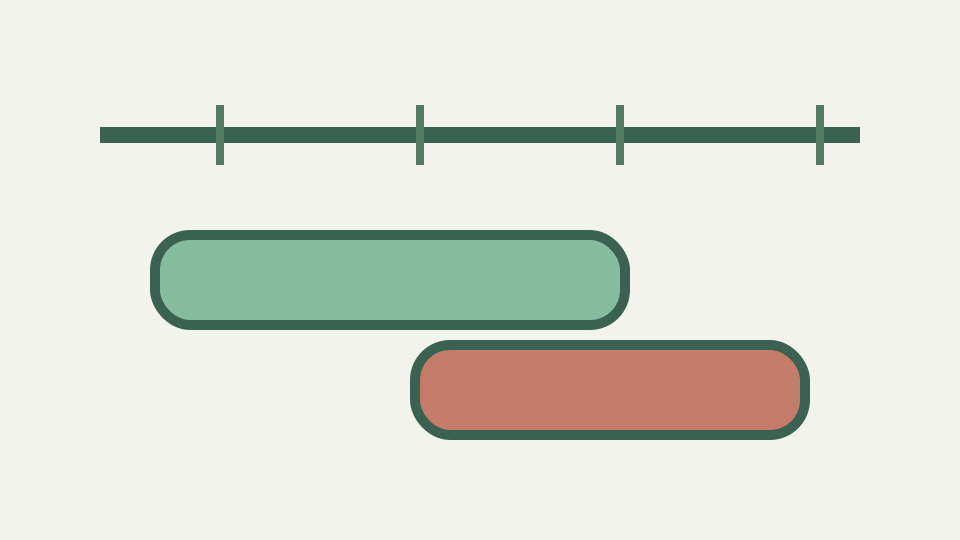
Cron starts a job on schedule whether or not the previous run has finished. This post explains why that causes corruption and load spikes, and shows the flock idiom that makes runs exclusive.
Two imports writing the same table — the hourly job got slower than an hour and cron kept starting new copies
An hourly expression can identify a new candidate while work associated with an earlier candidate is still running. Nothing in `0 * * * *` records duration, process identity or completion state. ToolAcre expands minute zero for every hour and can list future times, but it never observes the action between those times.
That means frequency and exclusivity must be reviewed separately. If a task can outlast its interval, first quantify duration on the target system. Then choose a concurrency control supported there. Editing a correct schedule cannot by itself add knowledge of an existing process or prevent a second invocation.
The expression contains no running-job state
The parser is stateless across calls. It converts text into sorted value arrays and warnings, while `nextRuns` searches dates without a process table. The UI recomputes from the current expression and does not retain a job lifecycle. Its model asks when, never whether a previous action remains active.
This is the precise evidence behind the article title. It does not require a claim about how every cron daemon forks or queues. The expression language itself lacks an overlap field, and the generator lacks a runtime monitor. Any exclusivity guarantee must come from a separate layer whose behavior is tested independently.
Possible overlap symptoms depend on the command and are not predicted by the generator
Overlap can correlate with duplicated work, lock contention or load, but those outcomes depend on what the command does. A read-only idempotent check and a stateful import have different risks even under the same hourly schedule. ToolAcre has no command parser, database connection or resource model from which to forecast them.
Document the action’s concurrency properties instead of attaching generic failure predictions to the expression. Measure normal and worst observed duration, identify shared state and decide what a skipped or delayed run means. Those operational facts determine whether exclusivity is necessary; the five fields determine only candidate times.
flock syntax and behavior are outside this repository
The workbook prescribed `flock -n`, a lock path and exit behavior. No flock implementation or test appears in this repository, so this module does not validate that syntax. Platform availability, filesystem permissions and lock lifetime all sit outside the browser’s schedule code.
If flock is appropriate on the target, use its installed documentation and test a harmless contention scenario there. Do not infer success because the prefixed timing fields pass ToolAcre. A valid expression can precede an invalid lock command, just as a correct lock can guard a schedule written for another dialect.
Worked boundary: verify hourly timing without claiming lock semantics
Use `0 * * * *` as the worked schedule. The description says minute zero past every hour, and previews should advance to successive hour boundaries after the starting instant. That proves the cadence ToolAcre computes. It does not prove what happens when the command’s duration crosses one of those boundaries.
Carry that hourly expectation into a target-side concurrency test. Start one harmless long-running instance, reach the next candidate and observe the chosen control. Keep results as execution evidence separate from the expression review. This preserves a clean diagnosis if either timing or locking later changes.
Alternative exclusivity mechanisms require target-specific evidence
Locks inside scripts, supervisor policies and service-manager behavior may all provide exclusivity, but their semantics cannot be ranked from this source. ToolAcre also does not know whether missing one run is acceptable, whether work should queue or whether a second attempt should exit.
Define those outcomes before selecting a mechanism. “Never overlap” is only one policy; coalescing, queuing and parallelism with partitioned state are others. The generator can supply the candidate cadence used in the policy discussion, while the implementation choice remains grounded in the actual runtime.
Distributed locking remains outside both schedule parsing and preview
A lock shared across hosts introduces coordination beyond local calendar calculation. No host identity, network store or lease appears in the parser. The article therefore avoids suggesting that a local file or browser preview solves distributed concurrency.
For multi-host work, use a coordination design whose failure modes, ownership and recovery behavior are documented and tested. Keep the five-field schedule as one input to that system. An expression can be perfectly portable while the exclusivity layer is deeply environment-specific.
Takeaway: schedule and exclusivity are separate problems — the generator handles the first, flock handles the second
Scheduling answers when another attempt becomes eligible; exclusivity answers whether it may start. ToolAcre implements only the former through field expansion and wall-clock preview. Its lack of process state is an architectural boundary, not a hidden default.
Build and verify the cadence, measure action duration, then test a target-supported concurrency policy. Reporting those as separate controls makes both reviewable. The generator does not schedule jobs, and a copied expression should never be described as protection against overlapping execution.