Video & subtitles · Subtitle Toolkit
How a subtitle file is edited without leaving your device: File API to Blob
· How it works
subtitles browser-processing privacy
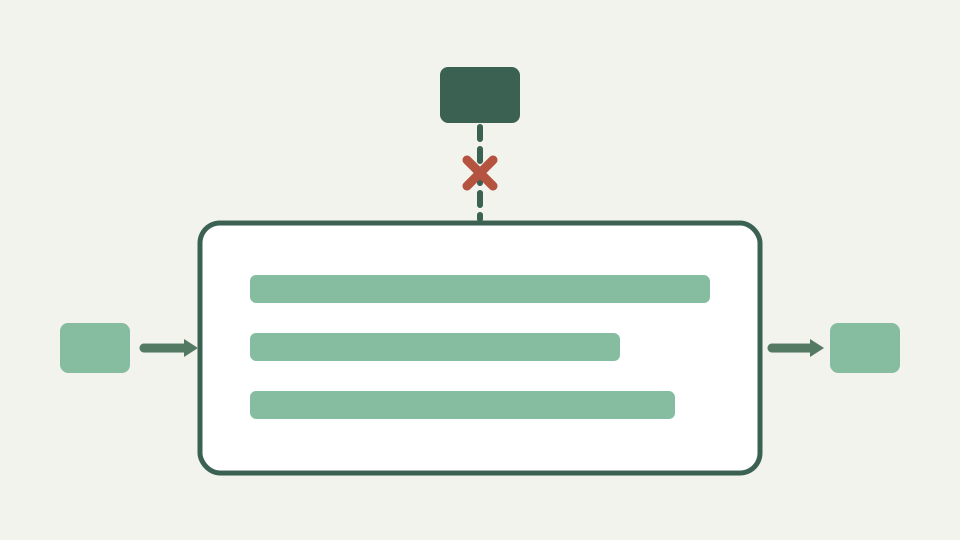
ToolAcre's file tools read and write files inside the tab. This post explains the browser APIs that make that possible for a subtitle file, from the file picker to the download link, and how to confirm nothing was uploaded.
The transcript is confidential and the converter wants you to upload it — the problem browser-side processing solves
A deposition transcript is not a file you hand to a web service to find out whether the conversion works. Most online converters are upload-and-return: the bytes go to a server, something happens, and a result comes back. For confidential material that is a disclosure, and it has already happened by the time you see the output.
Browser-side processing removes the question. The file is opened by the page rather than sent to it, every transformation runs against an in-memory copy, and the result is written back to disk from the same tab. The claim is testable, which matters more than the claim, because the network panel will show whether any request carried the contents.
Selecting a file: the File object — how the browser gives the page a handle to bytes without sending them anywhere
Choosing a file through a file input does not transfer anything. The page receives a File object, which is a handle: a name, a size, a type and a reference the browser can read from. Selecting a file is not an upload, and nothing about holding that handle causes a request. The bytes stay where they are until code asks for them.
This distinction is the whole basis of local processing, and it is also why the privacy property is a property of the code rather than of the browser. A page holding a File object is perfectly capable of posting it somewhere. What makes a tool local is that it does not.
Reading text locally — File.text() and TextDecoder turning bytes into cues in memory
Reading the text calls the File API text method, which resolves to a string decoded as UTF-8. That string is parsed into cues in memory, and every subsequent operation works on those cue objects: shifting adds to integer millisecond timestamps, cleaning substitutes over the text, validation walks the list looking for ordering and duration faults. None of it touches the original file, which is never written to.
Because the parse produces plain objects, the file on disk is untouched even if the tab is closed mid-edit. There is no temporary copy to clean up and no partially written output, since writing only happens when a download is requested.
Why this runs on the main thread rather than in a Web Worker, and what the size ceiling actually does
The workbook outline expects this stage to run in a Web Worker, and for several ToolAcre tools it does; the CSV, image and PDF apps each move their heavy work off the main thread. The subtitle app deliberately does not, and the reason is recorded in its own source: a worker would add a second bundle and a second failure mode for work that does not need it, because a feature-length caption file is a few hundred kilobytes and parses in milliseconds.
The honest caveat is the size ceiling. A ten megabyte limit is enforced before parsing and named on the tool page, but the tool documents that the check is skipped for anything named with a subtitle extension, so an oversized subtitle file loads and blocks the page rather than being refused. That is a real consequence of running on the main thread, and it is documented rather than hidden.
Writing back: Blob and the download attribute — how the edited file reaches your disk as a new download
Writing back builds a Blob from the serialised text and hands it to the browser as a download. The text is wrapped with an explicit media type carrying a UTF-8 charset, an object URL is created for that Blob, an anchor carrying the download attribute is clicked, and the anchor is removed. The file arrives in the downloads folder as a new file; the original is not modified.
The revoke is deliberately deferred rather than immediate. Revoking the object URL synchronously after the click can cancel the download in some browsers, so it is scheduled one macrotask later, which is both safe and prompt. This is the kind of detail that only shows up when downloads intermittently fail to start.
Worked example: watching the network panel during a full convert-and-retime — a quiet panel from file open to file save
Object URLs are the part that leaks if nobody is watching. The lesson is written into the repository helper: an audited project created object URLs in several places and revoked them in exactly zero, so every preview held its entire blob for the lifetime of the tab. On a phone, a handful of rasterised pages is enough for the browser to kill the tab.
The remedy is structural rather than disciplinary. Nothing calls the browser API directly; a scoped helper runs your code with a URL and revokes it when that code settles, on success, on throw and on rejection alike, and a managed handle offers an idempotent revoke for the cases that outlive a single function. Correct cleanup is the default rather than something each call site has to remember.
What this does not cover — the tool cannot protect a file you later upload elsewhere; the privacy ends where your workflow leaves the tab
To verify rather than trust, open the network panel before selecting the file and leave it open through the whole job. Pick the file, convert it, retime it, download the result. Requests for the page and its scripts appear when the page loads; what should not appear is any request whose payload is the file. Preserve the log across the whole session so nothing is missed between steps.
Two honest qualifications. A page can load analytics or advertising scripts from other origins, and those are visible in the same panel and are a separate question from whether your file was sent. And the property ends at the tab: a tool that processes locally cannot protect a file you subsequently email, sync to cloud storage or paste into another service. Local processing narrows the exposure to your own machine; it does not follow the file afterwards.
Takeaway: your file, your tab, your disk — how the Subtitle Toolkit does the whole job locally and lets you verify it
The path is file handle, in-memory text, in-memory cues, Blob, download, and nothing in that sequence requires a server. The file is read by the page rather than sent to it, transformed as objects, and written back as a new file, with the original untouched throughout.
The reason to prefer this for confidential material is not that a promise was made but that the claim is checkable in about a minute. Open the network panel first, do the whole job, and read the log. A tool that processes locally will show you a panel with no request carrying your transcript, which is a stronger guarantee than any privacy policy.